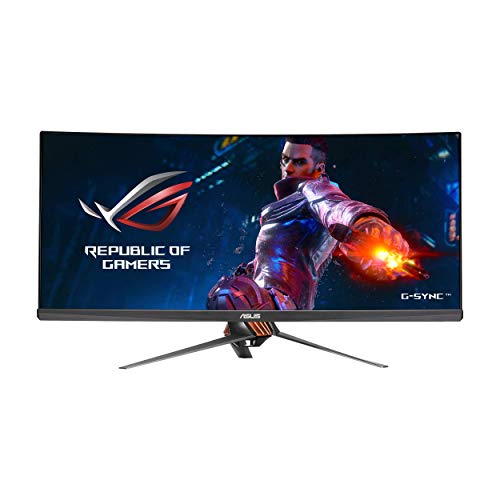
Before I start, I'll let you know I have a preference towards Asus and I also got this monitor from Amazon Warehouse Deals. Gaming was tested on a GTX1080Ti.
Reviewed as of 2-23-2018
Keep in mind, this review is strictly about the monitor. Not about the seller or any feedback on packaging and shipping.
========Asus and I backstory========
Before buying this monitor, the PG348Q, I've had the Asus ROG Swift PG278Q for almost 3 years and it has been a great monitor. I lucked out and haven't had any issues with it as a lot of other people have. So, here I am again, rolling the dice on another Asus monitor. These are fantastic monitors but be aware that build quality is an issue that plagues Asus to this day. What I'm saying is, don't be surprised or disappointed if the monitor you get has an issue. Amazon will graciously replace it. This new monitor isn't a replacement for said monitor, rather I will be running both together. The PG278Q is still a very high performance monitor even by today's standards. You can read my review on that monitor here: https://www.amazon.com/gp/review/RIW3GGTZB0QAI?ref_=glimp_1rv_cl
========Setup========
Got this monitor in and immediately began setting it up. The monitor portion itself weighs quite a bit and the mount between the monitor and the tripod like stand was surprisingly heavy. Made it really feel like a solid piece of hardware. Very simple assembly, was smooth. As I mentioned above, this monitor came from Amazon Warehouse deals, meaning someone more than likely returned it for whatever reason. Since most of the factory packaging was there and some stuff was in sealed bags, I feel it is safe to assume it had never been setup or turned on.
When you first turn on the monitor, it starts in HDMI input by default. Like a TV, you need to change the input through settings to Display-port; it won't auto detect. Just like my other monitor, it has the nice joystick on the back for navigating the menus. Very well done. This monitor has a max refresh rate of 100 fps, but 60 by default. Simply go into the monitors menu and hit the OC option to jump to 100Hz. Then in your card's control panel, be sure to select the 3440x1440 100Hz option.
========Thoughts on Performance========
Gaming:
I hopped into Battlefield 1 and wow it was incredible, such a wide view it looked great. Was easily able to max out the 100 fps on this monitor thanks to Battlefield being such a well optimized game.
Next, I tried Rocket League. Rocket League has a lot of camera rotation and very fast movement. While this monitor is great, I'm not sure it is fully up to the task as my PG278Q is simply because of the amount of pixels it has to throw around. Nothing sits still in this game haha. Everything is changing every which way and I'm not positive the ultrawide is particularly useful for the game. Will stick to PG278Q on this one.
And then I opened up PUBG. This game really made use of the ultrawide. Visibility is everything in this game and this monitor gives a real edge. You can see far and keep a huge area in view for potential victims haha.
For another game, I opened up Star Wars Battlefront 2. This is another fast paced game but it looked great and performed quite well. I'm not entirely sure ultrawide is particularly useful for this game but nonetheless it was fun haha.
Normal Use:
The extra screen real estate is very helpful. I use the Creation Kit for Fallout 4 and photoshop a lot and this has been proven to be a hugely good purchase. I can have a window be the size of my other monitor and then also have other stuff going on. This was my main reason for purchasing it and it works great.
========Conclusion========
Things I like:
Small bezels
Cool design
Works as described
Instant on, no Asus Logo
Things I don't like:
I wish it was black lol
Menu buttons (not joystick) feel very cheap.
Things I'm neutral towards:
That red light thing at the bottom. Meh, I don't really care for it lol. Seems like a gimmick.
It apparently has speakers? Didn't know that but my audio output changed to the monitor but I didn't hear anything.
So yeah, that's my review so far. Going to update this over time so let's see how this goes.
======Updates=======
9-25-2018 | Now 7 months later, still using the monitor as well as the PG278Q but this larger monitor has overtaken the other in just about everything! Haven't had any hardware issues. Still works perfectly like from day one.
6/8/2018: *PHOTOS COMING SOON* ROG PG348Q 34" 3440x1440 IPS
I have been using this monitor for the last 2 weeks. It does have the corner back light bleed that many people talk about, however this is only apparent when you have a completely blank screen, not during normal use or even when viewing dark scenes in game or movies. I came from the BENQ 4k 60FPS 1ms TN monitor that is out, and I can not tell the difference with input lag using this monitor. 100Hz works amazingly well, and although predator has the 120Hz, I don't feel you are missing out on much.
Fit, finish, quality is unlike other monitors I have played on.
3440x1440 is the perfect resolution, as my 1080 ti hybrid can pretty much hit 80-100fps in all games at ULTRA settings, and the GSYNC makes everything feel so smooth. It is one of the best feelings, especially with the ultrawide!
The colors of this monitor seriously make gaming all more enjoyable compared to TN panels. I will never go back to such washed out colors, unless I felt the need to join e-sports FPS and didn't want to have the idea in the back of my mind that a monitor with sub 4ms input lag was seriously impacting my ability to be a better player.
I have to go ahead and admit that I was able to get this monitor during a crazy Amazon Warehouse deal for 20% off. So keep that in mind during this review.
Also keep in mind that I'm a geek, but not a super-geek. So I'm not QUITE as picky as some of my more hardcore geeky brethren and probably much more forgiving of flaws.
"IF IT BLEEDS, WE CAN KILL IT"
Ok, worst quote ever to lead into light bleed. But you can, in fact, murder your monitor if you find the light bleed (which is definitely there) unacceptable. Personally, I have yet to own a monitor that DIDN'T have some level of light bleed. And it doesn't bother me at all as it is pretty much imperceptible unless the screen is lit in all black. And dude, some of these pictures in dark rooms showing what is supposedly unacceptable light bleed....come on, dude. Of course the light bleed is going to stick out like crazy when you have the lighting of a medieval dungeon. What do you expect?
Picture is sharp and clear. Had some issues at first with blurry apps but several driver updates later and it was fine. Again, I'm not a super geek and not quite as picky. I do enjoy watching movies and gaming at ultra settings and this monitor makes all that look pretty great, in my opinion. Yes, it's "only" 100Hz, but that, to me, is more than enough for anyone other than professional gamers. The monitor has decent speakers for a monitor, but no one ever writes/types home about native speakers on computer monitors.
"I DONT LIKE THESE THINGS"
If you're wondering where that quote is from, it's just something I'm sure someone said somewhere at some time about some thing. Anyway, looking at the build of it, others have posted pictures and yes, it looks like it was pulled from a sci-fi spaceship hull. You're either going to think it's cool or gaudy. I think that it's all going to be personal opinion when it comes to design.
The stand is heavy and takes up a ton of space. Obviously it's a large monitor, but the stand design forces you to sit it closer to the middle of typical, budget sized computer desk. You're going to need something deeper than a typical desk. Or a good arm desk mount would probably work, too.
Ports are in awkward places. They're up and behind part of the frame. Can't really see up there unless you're looking almost directly underneath with a flashlight. It was just slightly tedious getting my stuff plugged in but this is really pretty minor. I do appreciate the semi-cable management aspect of the design.
I really love this monitor. It's not perfect, but does what I personally need/expect/want perfectly so I'm happy to give it 4 stars.
Keep in mind, you're going to need a pretty strong GPU to run this thing with games. QHD on a widescreen is hard to drive at high gaming settings for anything less than a GTX 1080, I'd say.
Holy crap what's not to love about this monitor. I use this as my gaming monitor along with photo editing. I was unsure about the whole ultra wide thing and when I went to a local electronics store to check one out I was very hesitant about getting one. Reading reviews of the ultra wide monitors and this one in particular convinced me to try it. I am SO glad I did. For gaming it makes so much of a difference in the immersion that each game is like a whole new game. I haven't really had any problems with support, so far all my games have worked with the new wide resolution. The GSync works very well, the IPS screen is accurate with the colors, and the refresh rate is more then ample. Some caveats though, the screen is IPS so there is IPS glow. This is inherent in all IPS screens so it depends on how much you notice it. I don't notice it at all on this screen, yet I had a 25 inch and noticed it more often. The other caveat is that this screen is essentially a 3k screen. A lot of pixels to push around. You really need a beefy video card to power it. I use a 1080 ti and have no problems but even with that much muscle I only average mid 60fps in Assassin Creed Odyssey with settings on ultra. So just a heads up if you want to get one. It's pricey but I really do recommend this screen.
I have MINIMAL back light bleed on the top left and top right corners. It is very visible at 100% brightness and at a very dark setting. However 100% is too much for my eyes. I usually stay at 50% - 65% during the day, and I set it down to 20%-30% at night. At these settings I just mentioned, it is hard to notice the bleed unless I focus straight at it.
Overall I am extremely happy with my purchase.
As far as the monitor itself, it overclocks to 100hz without issues. I never experience any port detection issues. It fills my entire peripheral vision when I game, and color is great right out of the box! Really impressed with the QC! I chose Asus over Acer mainly because there are more complaints with bleed and glow with Acer's 34" Predator than the complaints found with Asus. Asus really did a good job with QC, and I feel very relieved that I got a good monitor with minimal issues not worth crying over. Even though it is not entirely perfect, it still is so much better to know it could have been worse and I could have received a more defective product and would have to go through an annoying return process.
As a gamer, I started out from a 40" 4k Samsung TV to a 32" BenQ 1440p 60hz VA panel Monitor to finally this 34" Ultrawide 1440p 100hz monitor. I am finally going to settle with this. I am satisfied with this product from all aspects:
Large enough for an immersive game play experience at the maximum settings possible.
100hz and extremely low input lag that solves the headache issues I was experiencing on a 32 inch screen w. V-SYNC on
IPS panel meaning beautiful colors meaning amazing colorful gaming experience with also design work for career
GSYNC? YEAH BABY GIMME SOME MORE
Some things for gamers reading up on these reviews:
- Don't wait months for a better monitor to be released in the future. This high end monitor is fantastic. Treat yourself now.
PC set up:
Intel 3960x @ 4.4 ghz
16 GB RAM
2 x Geforce 980's @ SC
1 x 256gb SSD
1x 4TB HDD
750 watt PSU
For those who have similar set ups: on optimized games, these games run great at 100fps easily. But if you are into DayZ, Player Battlegrounds, GTA 5, Deus EX (CPU & GPU intensive games), you will be dipping to 40s - 60s range at times. Yeah G-Sync makes it smoother at those frame rates, but you will visually notice some drop in performance when that happens. For me, that is very annoying! I am upgrading to an Asus 1080ti Strix OC and I will be better than fine for the next 2+ years.
So the final question is, is this monitor really worth the $1200? Yes it is only if you are passionate about hardware and pc gaming. I love my monitor. I enjoy gaming so much more now. After I get my 1080 ti strix OC, I will be in heaven.

Feature Product
- 34" 1440p IPS panel with NVIDIA G-SYNC Technology and 100Hz Refresh Rate deliver superior resolution, color, and smoothness, maximizing immersion in games
- Curved Ultra-wide 21:9 Aspect Ratio maximizes immersion by expanding the display right to the peripherals of your vision
- ASUS Eye Care technology lowers blue light and eliminates flickering. When coupled with ergonomics, gaming marathons just got a lot easier. VESA Wall Mounting : 3.93x3.93 (inches)
- 5-Way OSD Joystick delivers the most intuitive control scheme for a monitor, so you can access features such as ASUS Game Plus on the fly. Maximum brightness is 300 cd per meter square. Pixel pitch is 0.0092 inch. Operating temperature is 0 to 40 degree celsius
- ASUS Rapid Replacement 3 years warranty service with free cross shipping is included. NVIDIA G-SYNC eliminates screen tearing and stuttering for seamless gameplay
- Physical Dimension without Stand(WxHxD)- 32.6 x 12.7 x 4.2 inches(For VESA Wall Mount). Physical Dimension with Stand(WxHxD)- 32.6 x 22 x 11.6 inches
Description
The rog Swift PG348Q is truly the ultimate gaming monitor. Featuring a curved 34" IPS display at 100Hz, 21: 9 ultra-wide 1440P, ergonomics, NVIDIA G-SYNC technology, and aesthetics without equal, the PG348Q breaks the boundaries of 16: 9 and raises all aspects of gaming monitor technology to the absolute pinnacle.
The best monitor ever had yet; the control menu is the easier and the best to navigate, simple and easy, don't need to jump into 15 different sub menu to adjust one setting.
It is bright and sharp, the adjusting angle is wide, should accommodate most of the user's needs.
Simple to put together, just need to do two thumb screw; very solid and stable.
The only drawback is the design of the leg, if you don't like the screen to be too close, make sure you get a desk that is at least 24-30 inches depth, if not you will have the huge monitor very close to your face
I call her Beauty (this monitor), since I call my desktop computer The Beast.
I am a horrible photographer and even worse on this iphone 6s. (Yes, I still have a 6s. You can tell where my priorities are.). I wish the photos I attached would show the detail, vibrancy, and contrast in the colors.
Beauty is paired with the Nvidia Geforce GTX 1070ti graphics card. (No, I didn’t get a 1080. This one is just fine.) The graphics on Beauty with Beast’s help are amazing!
Beauty doesn’t curve as much as I thought she would, but I like her!
I was going to hang her on the wall, but I decided to try the stand out first and see how I like it. I have a 24” deep desk, and find the stand to be perfect for it.
Coming from my 23” 60 Hz Eizo, I feel like a kid at the candy store!
I have been putting her through her paces and have even set up an overclocked profile on MSI Afterburner. I could not be any happier! Gaming with her is such a pleasure! Send some Mountain Dew. I may never want to stop!
Pros:
1. No Bleed! I got a good one!
2. Fantastic Blacks!
3. Extra-wide screen.
2. Fantastic picture quality while not affecting in-game performance.
3. Love the joy stick you use to change settings. The controls are on the back, and you just wrap your hand around to reach them.
4. I thought I wanted a sleeker design, but I like the steampunk over-the-top design.
3. Everything but the 3 cons below.
Cons:
1. Not as curved as I would really like.
2. You have to be a contortionist to plug anything into it. The plug ins are on the back near the bottom and are hidden such that they are very hard to see and reach.
3. Don’t even try the speakers, but who uses monitor speakers anyway.
First time i got this monitor i got Like new from the warehouse around august , LOTS of light bleed! came in a custom box! Returned!
i took the risk again as Very good since it had a 20% off with a supposed scratch on top.....monitor came in the original box with everything sealed , Monitor is on PERFECT condition , no light bleed! overclocks to 100mhz and it looks like a dream . I am super exited about it, been using it for a few days and i suggest you take a chance since it is simply beautiful. I am very satisfied with my purchase ! From the stand to the back this monitor feels premium and looks fantastic , once you go IPS you cant go back.
I got 2 of these, and I have them side by side on my desk. They are incredible pieces of equipment! The design is immaculate. Highly functional, very well-made. The stand is the best I've ever seen. It's so easy to adjust and it includes features like cable management that I didn't expect. For gaming, they're great. You can crank up the FOV and see more. The resolution is amazing, and I use them for work as well. Having Visual Studio open with 3 files on one monitor and having room for lots of other stuff open on the other is great. There is little to no light bleed like IPS monitors are typical of. G-sync only works with 1 monitor (that I was able to deduce anyhow) but they're still great. Definitely want a decent graphics card driving them, but anyone looking for a monitor like this probably has one.
First off, I do not leave many amazon reviews...I basically do not care enough(selfish, I know). That said, I felt compelled to in this situation since reviews are all over the place.
In short, I had a ton of concerns based on other reviews before pulling the trigger on this monitor. But I have to say I had no issues like other people have mentioned..... no dead pixels or shadowing. Plus I rolled the dice and picked up a slightly used one which is pretty risky IMO. However the monitor came in perfect condition and is truly amazing to use...especially for gaming. Currently playing BF1 and the extra FOV and g-sync tech that you get makes the game play soooo much better. Its a true treat to game on and I highly recommend it if you are considering it. I also work from home and I have this paired up with another 27inch ASUS 4k monitor and makes multi-tasking easier...probably over kill for work alone but if you game occasionally and want to take it to the next level, then this monitor is for you.
