I was waiting for the Taz 7 to be released since it has been a year and a half since the Taz 6. I decided to get a "cheap" printer instead but I am glad I chose this one.
I had the machine together in about 20 minutes including unboxing. Put the machine on a flat surface and the tower will sort of self align (use a right angle to make sure it is 90 degrees), put the four screws in, connect the motor cables (which are labeled!) and DO NOT forget to connect the black ribbon cable from the extruder to the base! (The manual does not mention this). I leveled the Z axis by spinning the motor shafts until I could loosely wiggle a circuit board under each side. The initial height does not matter, only that the rods are level.
Tighten EVERYTHING including the set screws on the X axis rods. Mine came loose and my Z axis would not home. If you are having Z axis issues unscrew the belt, loosen the X axis rods then wiggle them to realign them then put everything back together.
To level the bed, home the Z axis with the four screws on the bed at the lowest position (so it does not strike the bed). Use the Tools -> Move command to place the nozzle at the four corners of the black print surface. Use a business card inbetween the nozzle and the bed then turn the screw until you just feel friction on the business card. The built in home function misses the back left corner for some reason.
Loading filament is easy, just cut a small piece off at 45 degrees to prevent clogs, place the filament into the extruder by pressing the black lever until it stops. Use the load filament command until a little filament oozes out. Unloading is pretty similar, heat it up and use the unload command to remove it.
The included sd card includes a few models and I was able to just barely print 3 of them with the included sample filament. I think they are set to be high precision to impress the user - they take about 2-3 hours to print but do come out very well.
I am using Solidworks to generate my STL files but you may want to head over to Thingiverse to grab some premade stuff. This is where the fun begins - slicing. There are several slicers in free, freemium, online, and paid. I prefer Cura since it is simple and works. Slic3r is a good alternative. If you have a Raspberry Pi then you can try Octoprint (Incredibly easy to get running by the way). There is also Simplify3D but I do not recommend it since it cost $150 for two installations and requires you to log in to use the desktop program (good luck when their servers go down). Slicers are a whole different topic but if you chose Cura, you can use the Prusa i3 (which this unit is based off of) or you can add your own printer and specify a 200x200 and 180 height bed with a 0.4mm nozzle and 1.75mm filament with a rectangle bed that is heated. The included Cura version on the SD card is outdated and I believe you can import the included gcode to generate a modern cura profile.
Once you are confident in the machine then find a better Spool holder, filament cooling fan shroud, Z axis brace then your prints will turn out much better. The stock spool holder can jerk when feeding and cause Z axis artifacts while the stock filament fan shroud isn't directed enough. After those mods then you can start looking into adding a better Y axis plate, different print surfaces, and so on. The Select Plus is a 24v model, so if you upgrade the fan then be sure to use a 24v fan. You might also have to perform searches for the Wanhao duplicator i3 to find upgrade parts.
This machine is for tinkerer's so I did not mind having to play around with the X axis rods and can't count that against the machine. I did contact Monoprice support via their website chat and they told me they would send a replacement but I needed to do it though Amazon. I sent them an email but have not heard a response (it has been almost a week). The print quality out of the box is great, it has a large build surface, and was very easy to get running (including with octopi). Overall I think this is a great printer for the price range. It does not have the fancy features like auto leveling or dual extruders but this will satisfy the average hobbyist needs.
I have only had this printer about a week, so if I come up with any other tips, based upon my experiences with this printer, I’ll add them to this review. I am pleased with the items I have printed, so far. This printer seems to be doing a good job.
This printer is the same as the Wanhao i3 Plus, so if you need to find resources, this is the printer to look for. I am a newbie to 3D printing, so my comments are based upon my very limited knowledge of how this works. A couple of other items that a newbie needs to purchase: 1st, You should purchase PTFE Tube. The one I purchased was PTFE Teflon Bowden Tube for 1.75 Filament (2.0mm ID/4.0mm OD) - 1.5 Meters and it worked fine. The PTFE tube is attached to your Brass Nozzle to guide filament into the nozzle and can become plugged very easily with newbie mistakes. 2nd, Purchase some brass .4mm nozzles. My nozzle became clogged and I could not find a way to easily remove the clog. Another newbie problem. The ones I purchased were BIQU MK10 M7 0.4mm Extruder Brass Nozzle Print Head for Makerbot 2 RepRap 1.75mm Filament 3D Printer (Pack of 5pcs). 3rd Item to consider purchasing is a pack of .4mm drill bits. These are used to clear clogs in the nozzle and they break very easily. One is included with the printer, but I broke it very early in my venture. The ones I purchased were: JOYSA 5PCS 0.4mm Drill Bits for 3D MakerBot Printer Nozzle Cleaning Kit BY JOYSA US Registered Brand. With those items close at hand, you should be able to print continuously without waiting for the next package to arrive. Also, if you are new to this craft, search the web for pointers on 3D printing. There is a lot of information out there on this printer, so take advantage of it as it will allow you to bypass many beginner mistakes.
In regards to the printer, it comes mostly assembled with only a few parts to attach to complete the assembly. The manual seems to be outdated as some of the included pictures and guidance did not fit the printer that I received. I went to the internet for guidance on some of these issues. One thing to look for during your printing is that the nozzle temperature is properly set. Many times when I preheat for PLA, the temp will rise as it should, but when I select an item to print from the included SD card, the target temp will go to zero. When I see this happening, I go back to pre-heat, select PLA, again and return to the print screen. Most times the target temp is now correctly identified. A couple times I have had to turn the printer off and back on to get the print temperature to be identified properly. Not a big issue, but when the target temp is zero, that is what the printer head is striving to reach.
I am pleased with the product and the printing that it is capable of doing.
Ok so I'm a noob when it comes to 3d Printers, but trust me when I say this, I'm no noob when it comes to building things to specification. They claim 10 minutes, but what's not discussed is a level, and a means to judge 1mm. I used a normal 6' level and feeler gauges mainly used to measure spark plug gap. The device says to level the platform by 1mm, I found using a regular A1 sheet of Paper, normal American paper for those who never traveled outside the USA. Took me 3 days to finally get this thing level and working pristine. But once I got it, she was OFF, no mistakes, no issues so far. Double check your level, 2 or 3 times, and do small prints to judge what you need to change and where. There are 3d Print files for modification parts, ie adjustable legs, Z-Axis supports. You can also find a more sturdier build plate. The main issue I had with mine was leveling the build plate, one corner will be completely compressed, and the other 3 would be completely free from the screws. I Raised the Y-Axis stopper switch from the 4th hole to the 3rd hole, adjusted the Z-Axis up, and re-leveled only the bed adjust screws, and pow, done. Make sure your bed is warm when you print, if you have raised edges your bed is too cold, warming it up will keep those edges from curving and messing up your print.
As one of the pre-orderers, I have had this printer for over a month now, have printed some ambitious prints, and can say that this printer has been hassle-free. As the description says, the setup is incredibly straightforward and I was printing within 30 minutes with the sample files provided. Since the initial setup, the printer has mostly been printing the whole time with some prints lasting as long as 2 days. Almost all prints were printed from the builtin SD card reader, however I currently have the printer set to print with a Raspberry Pi and OctoPrint.
This printer has very good bridging and makes consistent prints, even at faster than the recommended speeds with the included Cura settings.
It also comes with the filament spool holder, axis home sensors, bed leveling screws and has been rigid without wobbles or excessive vibration. The rebranded Buildtak bed surface really does wonders with bed adhesion with PLA and ABS.
To date I have printed with PLA, ABS, and PETG. Please note that this printer cannot print PETG without modification. I swapped out the default hot end with the Micro Swiss MK 10 all-metal hot end.
The most complicated print to date was the Hovalin, the 3D printed violin, and yes it does play well. This was printed with Inland PLA, .1 layer height, 60mm/s, 2mm wall thickness, 50% infill w/ triangles.
10/10 would recommend.
great for a beginner, but you can go to their site and use a promo code to get it for 300 ... now if you are a beginner ... it is likely you will do a lot of mods (check for the mmsp group in facebook for tips) ... so all in all I have probably put an extra 150 bucks into this thing to make it even better ... and for that price you can almost dump it on a cr10 ... and that thing has a MUCH larger print space, and from what I saw in youtube videos the quality out of the box is better.
Also dont use the software that comes on the sd card ... download free cura from curas site, it will print in 1/2-1/4 the time and have better quality. Or spend more money on simplify 3d.

Feature Product
- Support for All Filament Types: The heated build plate and wide range of extruder temperatures allow this printer to work with any type of filament, from basic filaments, such as ABS and PLA, to more advanced materials, such as conductive PLA, wood and metal composites, or dissolvable PVA.
- Quality Assurance/Technical Assistance: Live chat at Monoprice.com Mon through Fri 6am - 6pm PST | Email at tech@monoprice.com | Phone at 877-271-2592 Mon through Fri 6am - 5pm PST.
- Compact Desktop Design: Featuring a small footprint and basic, open frame design, this 3D printer is compact enough for any desk
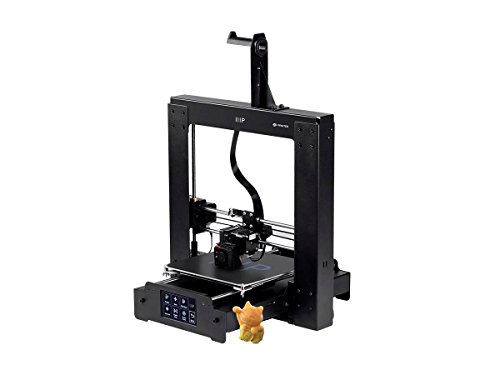
- Ready to Print include sample PLA filament and a MicroSD card with preinstalled models, Build area 7.9 x 7.9 x 7.1 inches, printer frame dimensions 15.7 x 16.1 x 15.7 inches
- Heated aluminum build plate nozzle cooling fan for printing all filament types. Complete kit with sample PLA filament, bed scraper, and MicroSD card with preloaded model files. Micro USB and MicroSD card connectivity. PC and Mac compatible. Compatible with Cura, Repetier, and other software.
Description
If you're ready to take your ideas and designs from paper or CAD file to the next level, the Monoprice MAKER SELECT 3D Printer is the perfect starter solution for your needs! Unlike kit-based printers, which require a certain level of knowledge, experience, and time to assemble, the MAKER SELECT 3D Printer is assembled using only 6 screws and includes everything you need to begin printing right out of the box. It has the ability to print any type of 3D filament and has a price point lower than most DIY kits, making it the best in class choice for your 3D printing needs.
This is my first 3d printer, so I didn't want the cheapest, or the most expensive. These "Prusia i3" clone type printers are very common, with cheap and easy to find parts, so it seemed like a logical choice for a first printer.
The printer is 90% assembled, which is nice. I was weary of similar, slightly cheaper, printers that took 4+ hours to assemble. I was able to start printing within 30 minutes of opening the box. All you really need to do is put 2 pieces together with a few screws, and level the bed. Leveling the bed is very important to the quality of the prints, so don't skimp on that step!
I've gone through about 1kg of filament printing so far, and its holding up well.
Some advice to noobies like myself:
Lower-end printers like this are best suited for printing with PLA. You might have good luck with PETG, but you probably won't have good luck with ABS. I had to set my temperatures a little higher than recommended. Not sure if that's a calibration issue or what, but 220 nozzle temp and 70-80 bed temp works best for me when printing with PLA.
I would recommend using the included slicer software (it comes on the SD card). It has the settings pre-loaded for the printer. I fooled around with another slicer at first, and it was hard for me to get the settings right as a noobie. The included slicer is easy to use, so there's not much reason to use another one.
This isn't a Pro-grade machine, but it isn't priced as one. For home-tinkering, I think this printer is a great value.
This printer is amazing for the money. It has significant upgrades when compared to the previous versions. This is actually a wanhao duplicator i3 plus with monoprice badging. The upgraded 24V system adds an additional layer of safety. Less amperage through the connectors means no more fire risk. I've put 3kg of filament through this printer and have not had a failed print yet. it only took 30 mins to unbox, setup and start my first print. It comes with an 8gb SD card which was a nice bonus.
So far i've only found a few downsides:
-The filament holder does not fit a whole 1kg spool and allow it to spin freely. (there are plenty of printable upgrades online)
-Bed leveling is easy but will take some time to find the right spacing between the nozzle and the bed.
-The fans will eventually need to be replaced. 3kg in and I'm starting to notice some bearing noise. It usually quiets down after running for a few minutes. fans are under $10 for a set.
-Models are loaded with an SD card. I didn't have an SD card reader. I'd much prefer to use a USB flash drive. You cannot hook the printer up to your computer with a USB cable without following guides online to change a jumper position on the mainboard. However, printing from a computer is risky. If it goes to sleep or restarts because of auto updates your print will stop.
For under $400 I'm blown away with the quality of the prints and ease of use.
This is my first review of anything much less a 3d printer. Keep in mind, this is my first 3d printer, so I am no expert. I am rating this so high for the following reasons.
First, I expected it to be more difficult. It was pretty easy to get it up and running. I should mention that I ordered this printer on Friday and got it on Monday. I was told I would get it Tuesday.. maybe UPS should get some of that credit but they must have shipped right away.
Secondly, it printed very nicely. I had it up in running in an hour or two. The biggest issue was the manual that came with it had a few errors. The manual said to get the slicing software on Monoprice's website. But I discovered later that Monoprice provided a custom slicing software on the sd card they provided. The software on their SD card is MUCH better than what I downloaded from the slicing software website, mostly because it was customized for this particular printer.
Assembly consisted of bolting 6 bolts to attach the vertical piece to the bed (4 bolts), and two bolts to hold the roller holder at the top of the vertical piece. Leveling was not too hard, i needed a small level (maybe 8 inches) to be sure the bed was level, and the vertical piece was vertical. Then I adjusted the bed just a few mm from the jet head at all four corners of the bed using a couple of business cards as a measurement device. You MUST purchase some PLA because the box had VERY little and it was white. I should also mention that there was a butterfly printed on the bed when i got it, they state that they print this before it leaves the assembly facility for calibration checks. Be sure the take that off with the supplied putty knife (it comes off easily), as the instructions did not mention that.
I had read that the smell and noise of printing was pretty bad, i have not observed either of those problems, the printer is quiet, and no strong smell if any at all from the PLA.
The printer has a printer USB connection (the square one). I assume I could print from my computer with the supplied usb cable, but I have been using it as a standalone printer, moving files back and forth with the supplied SD card.
The sd card came with 4 or 5 sliced example/test 3d objects, but I could not determine what they were so i printed the first one, it was a swann. Came out really nice. I then tried to bring my own 3d model, and had some issues, it turns out it was the slicer I downloaded from Cura because the customized (by Monaprice I assume) Cura exe on the SD card sliced my model up and it printed perfectly.
One last thing, with my 3d model, i wanted it to be solid. The slicer software put in a honeycomb sort of structure in it as filler, I assume to save filament. The slicer software dumbs down the process so you don't get an option of FILL IN the object. HOWEVER, there is an expert selection on the menu where you can ask for any percentage of honeycomb you want, to include FILL IN the entire model.
This printer was delivered, fast, complete, easy to assemble and level, prints great, comes with excellent (customized slicing software for this printer), is quiet, and inexpensive.
By far, it is harder to model a 3d object than it is to use this printer. While I have only printed a couple of models so far, I am thrilled with this product so far. If you have been on the fence like I have been for the past year, its time to get your feet wet.
Initial review, if I don't forget I will come back to update it.
Initial impressions were not so great... It may have been that this particular unit had been already shipped/returned and reshipped to me. It appeared as though the outer tape had multiple layers on the box. Not a clear-cut sign, but when I opened it up I saw that the foam padding had an outer wrap of plastic, but this had been already cut/opened as well. There was also no paperwork in it whatsoever. For a machine you have to at least minimally assemble this would seem like a somewhat important piece to include.
So, the unit itself had only a few minor things... One of the rail bearings on the extruder assembly had come out of the plastic mount. Thankfully the mount wasn't broken, and when I re-inserted it things seemed to work OK. The plate bearings have some noise, but without another to compare it to I can't say if it is bad or not. The movement at least seems pretty smooth.
So I have quite a bit left ot learning to do, obviously, and I don't have any filament here so I simply leveled the bed and did a short "test print" without filament only to have it do some movement to hear that everything sounds smooth. I tested the extruder load/uinload just to be sure that was operational. Now only waiting for the filament which was delayed due to weather....
This is my second 3d printer. My other printer is the Monoprice Maker Select so this is an upgrade from the first. The printer takes about 30 minutes to set up and start printing. The instructions are kind of sparse for a first time user but there are many websites to help you get up and running if you need help.
You will need to check to make sure all screws are tight and the machine is level. Bed leveling is he biggest challenge, but it doesn't take that long to master. All 3d printers make squeaks and squeals as they are printing so please take that into account when fining a place to operate the printer.
My preferred brands of filament for this printer are the Monoprice Premium filament or the Hatchbox filament, they both work equally well in the 195-200 degree range
While this is a good printer out of the box, I do recommend a few additions to make it function better. Please do not worry about performing some modifications as almost all 3d printers take a few mods to make them operate at peak performance. The first mod is a longer filament holder as the factory holder is too small for a 1kg filament spool. next, I recommend a filament guide to keep seamless feeding f filament into the machine. Finally, I recommend the Z-axis bracing mod to help dampen vibrations while you are printing. All of these modifications can be found on the Thingverse website.
As I stated earlier, I have the Monoprice Maker Select and have used it for over 2 years with only a minor tweaks needed. I expect the Monoprice Maker Select Plus to operate as trouble free and the select and choose the plus due to it space savings design over the select.
Have fun printing!